ARTICLE
SaaS Product Redesign That Actually Moves Metrics (Not Just Pixels)

Dmitriy Dar
Founder
Updated:
Introduction
Most teams start a product redesign with the wrong question:
“How should this look?”
The real question is:
“What’s making users hesitate, stall, or churn — and how do we remove it?”
A SaaS product redesign is not a UI refresh. It’s a controlled intervention into your business model: onboarding, activation, trust, decision clarity, and repeat usage.
If your redesign doesn’t move at least one of these, it’s cosmetic:
Activation rate (users reaching first value)
Time-to-value (how fast they “get it”)
Retention/churn
Support load (tickets, confusion, misclicks)
Conversion to paid (for PLG) or demo quality (for sales-led)
This guide is how serious teams do it in 2026: measurable, UX-led, and grounded in how real users behave.
When you actually need a product redesign (signals you shouldn’t ignore)
A redesign becomes urgent when:
New users don’t “click into value”. They sign up, poke around, then disappear. Your product is not teaching them the mental model.
Your UI is dense but not actionable. Dashboards show data, but users still don’t know what to do next.
Navigation has become a junk drawer. Features were added over time without architecture. Users hunt, guess, and bounce.
Trust is fragile. Common in finance, security, infra: users fear misclicks, fear risk, fear “unknown consequences.”
Your pricing moved up, but the product still feels cheap. Upmarket motion fails when the UX still looks like a prototype.
Support is doing the product’s job. If onboarding and UI don’t answer the basics, your team will.
A redesign is not about taste. It’s about removing friction that kills growth.
The redesign mindset: “flow first, UI second”
The fastest way to waste money is to redesign screens before you redesign the path.
A product is a sequence of decisions:
Where am I?
What matters right now?
What is safe to do?
What’s the next best action?
What did the system do after I clicked?
That’s UX. And in SaaS, UX is revenue.
Good redesigns follow a simple order:
Reality (data + user behavior)
Structure (flows + IA)
Interaction (states + error prevention)
UI (hierarchy + system + polish)
If you flip it, you get a pretty product that still doesn’t work.
Step 1: Define the redesign goal in business language (not design language)
Before a single wireframe, you need a clear target.
Examples of redesign goals that actually matter:
Reduce time-to-value from 12 minutes to 3 minutes
Increase activation from 18% to 30%
Cut onboarding drop-off by 25%
Reduce “Where do I click?” tickets by 40%
Increase demo-to-trial conversion by improving first-session clarity
Improve adoption of one key workflow (the one that drives retention)
If your goal is “modernize the UI,” you’ll get modern UI. You won’t get growth.
Step 2: Find the real friction (not the imagined friction)
Here’s what we pull before we touch design:
Quant signals
Drop-off points in onboarding
Feature adoption vs. your “core loop”
Time spent in key screens without action (classic confusion marker)
Rage clicks, back-and-forth navigation, repeated settings toggles
Support tickets tagged by theme
Qual signals
5–10 short user conversations (what confused them, what they expected)
Sales call notes (what blocks approval internally)
Churn reasons and cancellation free-text
Internal team pain: “We always explain X…”
A redesign should start with one honest sentence:
“Users are failing here because…”
Not “we want the UI to feel more premium.”
Step 3: Rebuild the product around the “critical paths”
Most SaaS products have 2–4 paths that matter more than everything else.
Examples:
Connect data source > configure > see insight
Create request > review > approve > export evidence
Add users/roles > set permissions > complete a workflow safely
Create a dashboard view > take action > confirm system status
Redesign works when these paths become:
shorter
clearer
safer (error prevention)
easier to repeat (muscle memory)
Everything else is secondary.
Step 4: Fix information architecture (IA) before redesigning UI
A lot of “bad UI” is actually bad architecture.
Common IA failures:
Same feature in 3 places (because nobody knew where it belongs)
Navigation based on internal org structure, not user jobs
Too many top-level items (users don’t decide, they flee)
Settings scattered everywhere
“Dashboard” that tries to do everything and becomes meaningless
A better IA rule for B2B SaaS:
Mode-based structure
Monitor mode (overview, health, status)
Operate mode (inbox, tasks, execution)
Configure mode (settings, integrations, policies)
Prove mode (exports, logs, audit trail, history)
This is how serious products feel calm even when they’re complex.
Step 5: Design for decisions, not for screenshots
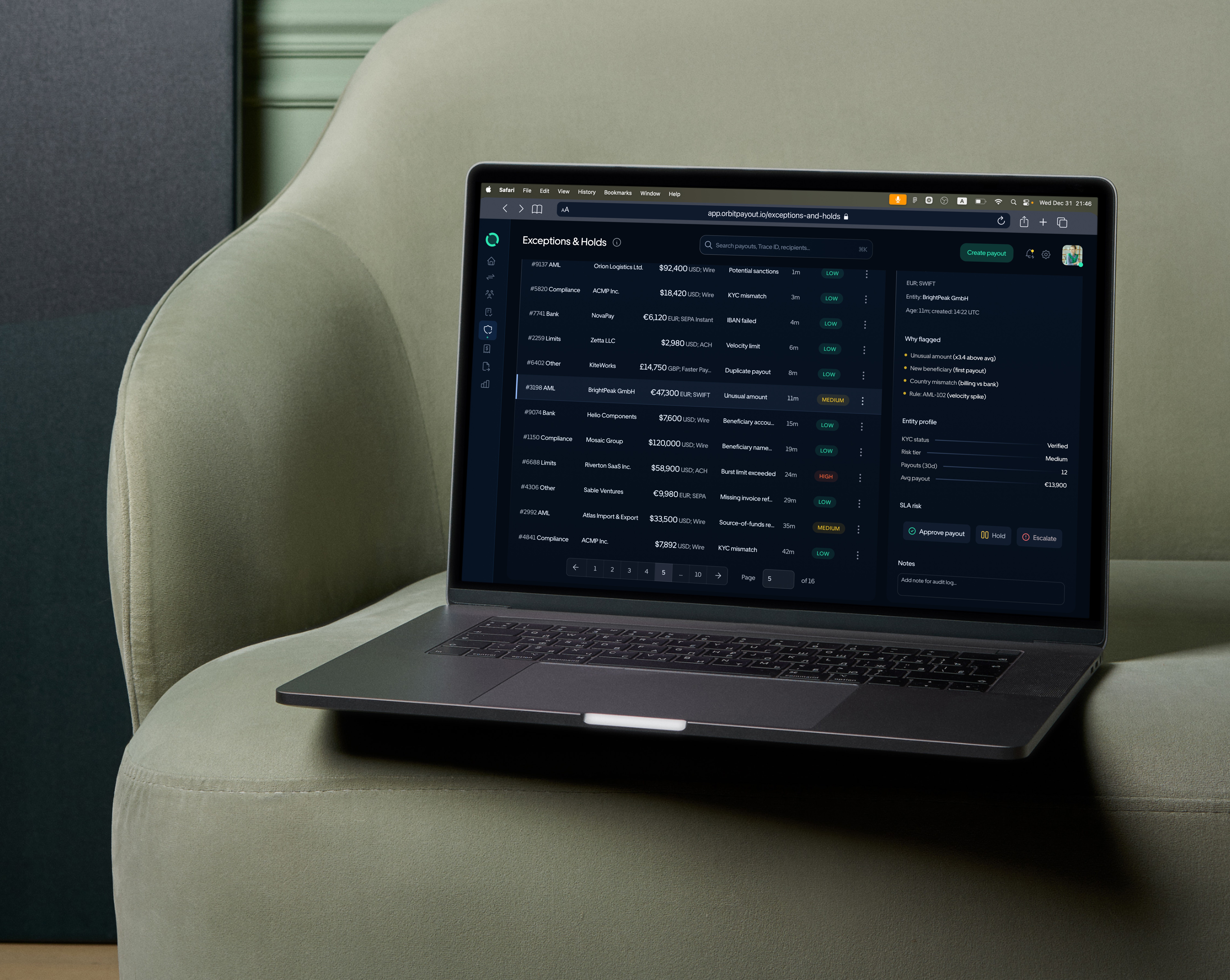
Redesigns that win feel like a control room:
you can scan fast
you can act safely
the system shows what changed
the UI never surprises you in a dangerous way
Practical UX mechanics that move metrics:
Strong hierarchy: the “one thing that matters” is visually obvious
Status systems: consistent states that reduce cognitive load
Progressive disclosure: summary first, detail on demand
Clear empty states: users know what to do, not just what’s missing
Error prevention: destructive actions are rare and deliberate
Audit mindset: history, notes, “who did what” is not optional in B2B
If your product is in finance/compliance/ops: trust is a feature. Your UI should visibly behave like it respects risk.
Step 6: Make onboarding teach the mental model (not just the buttons)
Most onboarding fails because it tries to teach features instead of teaching:
what the product is
how users win with it
what “good” looks like inside the system
High-performing onboarding usually includes:
a quick “setup path” (3–5 steps max)
an early “first success” moment (something tangible)
a visible progress cue (users need momentum)
a guided next action, not a dead-end screen
Onboarding isn’t a tour. It’s a value delivery system.
Step 7: Build a design system that makes the product scalable
If you redesign without a system, you’re creating future chaos.
A SaaS redesign should end with:
component library (tables, filters, pills, modals, panels, forms)
typography scale and spacing rules
state semantics (success, warning, risk, disabled, loading)
reusable patterns (list → detail, search behavior, bulk actions)
accessibility and readability baseline
Why this matters:
faster development
fewer inconsistencies
predictable experience = higher trust
your product stops “decaying” with every new feature
This is where boutique studios outperform “pretty UI teams”: we don’t just design screens, we design systems.
Step 8: Launch like an adult (iteration beats perfection)
A redesign shouldn’t be a one-shot gamble.
The clean rollout approach:
Phase 1: fix the critical path + onboarding clarity
Phase 2: improve power-user workflows + evidence/proof features
Phase 3: system polish + speed + accessibility + edge cases
What you do after launch matters as much as the design:
track new activation/retention cohorts
watch where users hesitate
ship improvements in controlled sprints
Redesign is not “done.” It’s stabilized.
What you should expect from a real redesign partner
If a studio starts with “style direction,” ask them one thing:
“What metric are we moving — and how will you prove it?”
A serious partner will:
audit behavior and friction
rebuild IA and flows
design trust + status semantics
create a scalable system (not one-off screens)
deliver with clear feedback loops and documentation
That’s the difference between a redesign that looks expensive and a redesign that earns money.
If you want this done properly
DAR Design builds SaaS redesigns around flow, heuristics, evidence, and business reality, not decoration.
Case from our practice
A cybersecurity SaaS came to us asking for a “redesign,” but what they actually had was a decision breakdown: users were getting lost, hesitating, and churning — not because the UI looked outdated, but because the product was built around imagined user behavior. The founders had shipped an MVP fast (totally normal), but then kept scaling on top of it without ever validating the mental model. The result was predictable: chaotic navigation, contradictory CTAs, “flows inside flows,” and screens where even the team struggled to explain what the user’s next step should be.
We approached the work as a controlled intervention into the critical moments — where frustration spikes and value collapses. First we isolated the churn points: users ran a scan, saw results, and then hit a dead end (“Now what?”). Session recordings showed repeated back-and-forth navigation, rage clicks on elements that looked like progress, and long idle time on dense dashboards with no clear action hierarchy. Fixing that wasn’t about adding tooltips — tooltips were the bandage. The real fix was structural: we rebuilt the information architecture into a coherent chain (Monitor → Act → Configure → Prove), standardized action language (one primary verb per screen), and designed system states that reduced uncertainty (“Monitoring active,” “Next scan scheduled,” “No action needed,” “Action required”).
Only after the core paths were stable did we add guidance mechanics — lightweight tooltips, progressive disclosure, and “next best action” prompts — to teach the user the product’s logic without overwhelming them. The outcome wasn’t just a cleaner interface. It was a product that respected cognitive budget: users stopped spending attention on orientation and started spending it on decisions. That’s the line between a reskin and a real redesign: one repaints the same confusion, the other rebuilds the product around how users actually behave. (Client and product details anonymized.)
Sources
Nielsen Norman Group — 10 Usability Heuristics for User Interface Design
Nielsen Norman Group — Information Architecture: Study Guide
Nielsen Norman Group — 8 Design Guidelines for Complex Applications
Nielsen Norman Group — Onboarding Tutorials vs. Contextual Help
Google Research — Measuring the User Experience on a Large Scale (HEART framework)
FAQ
How long does a SaaS product redesign take?
Most focused redesigns take 4–8 weeks, depending on scope, number of key workflows, and whether you also build a design system. A “critical-path-first” redesign can show impact earlier than a full product overhaul.
How do we make sure the redesign improves activation?
You anchor the redesign to the first value: define what “activation” means in your product, instrument it, identify where users stall, then redesign the path to make the next action obvious and safe.
Should we redesign onboarding or the dashboard first?
Start where the business is bleeding:
If users don’t reach value > onboarding + first-session flow first.
If users reach value but don’t operate efficiently > dashboard/workflow redesign first.
What’s the biggest reason redesigns fail?
They focus on UI polish while keeping the same broken architecture, vague messaging, and weak status semantics. The product still feels confusing or risky — just prettier.
Do we need user research for a redesign?
Yes, but it doesn’t have to be a 2-month research program. Even 5–10 targeted user conversations + behavior data will reveal the main friction patterns.
How do you redesign a complex B2B product without making it overwhelming?
Mode-based architecture (monitor/operate/configure/prove), progressive disclosure, consistent states, and workflow-first design. Complexity isn’t the enemy — ambiguity is.
Will a redesign reduce support tickets?
Usually, yes, if you target the sources of confusion: unclear next steps, inconsistent states, poor empty states, and missing “why/how” context around actions.
What deliverables should we expect from a high-quality redesign?
A strong redesign typically includes: UX audit insights, user flows, IA, wireframes (where needed), high-fidelity UI, component library/design system, interaction/state definitions, and handoff documentation for dev.
Is a redesign the same as a design system?
No. A redesign may include a design system. But a design system is the backbone that keeps the product consistent and scalable after the redesign ships.
How do we measure success after launch?
Track activation cohorts, time-to-value, retention/churn, adoption of the redesigned workflow, support ticket themes, and conversion to paid (or demo quality if sales-led). Success is behavior change, not compliments.
TEAM'S BLOG